Release Note
Client Profile Tag Management
Release date:
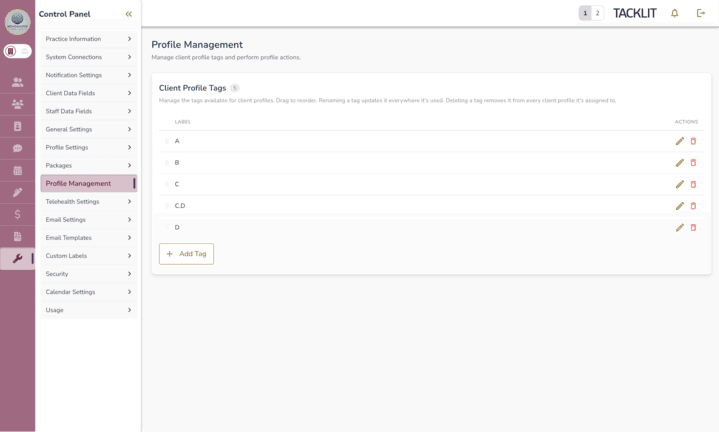
Superusers can now manage the list of client profile tags directly from the Control Panel. The new UI gives admins full control and propagates changes consistently across every client record.
What's New
• New "Client Profile Tags" card under Control Panel > Profile Management
• Inline create, rename, and delete with a 50-character label limit and case-insensitive duplicate detection
• Drag-and-drop reordering. The chosen order is now respected everywhere tags are displayed
• Batch save: admins make multiple edits and click Save once. Discard reverts pending edits
• Cascading delete: removing a tag here removes it from every client profile it was previously assigned to
• Profile Management subtab is now visible to all Superusers
Rollout
• No data migration required. The order field is optional and back-fills naturally on first save
• Cascading delete is irreversible. Worth flagging in support docs if a customer asks "where did my tag go"
• No feature toggle on the new card; it ships on for all Edge Admin users
Out of Scope
• Bulk import / export of tags
• Per-clinician tag visibility rules