Release Note
Invoice Items Grouping
Release date:
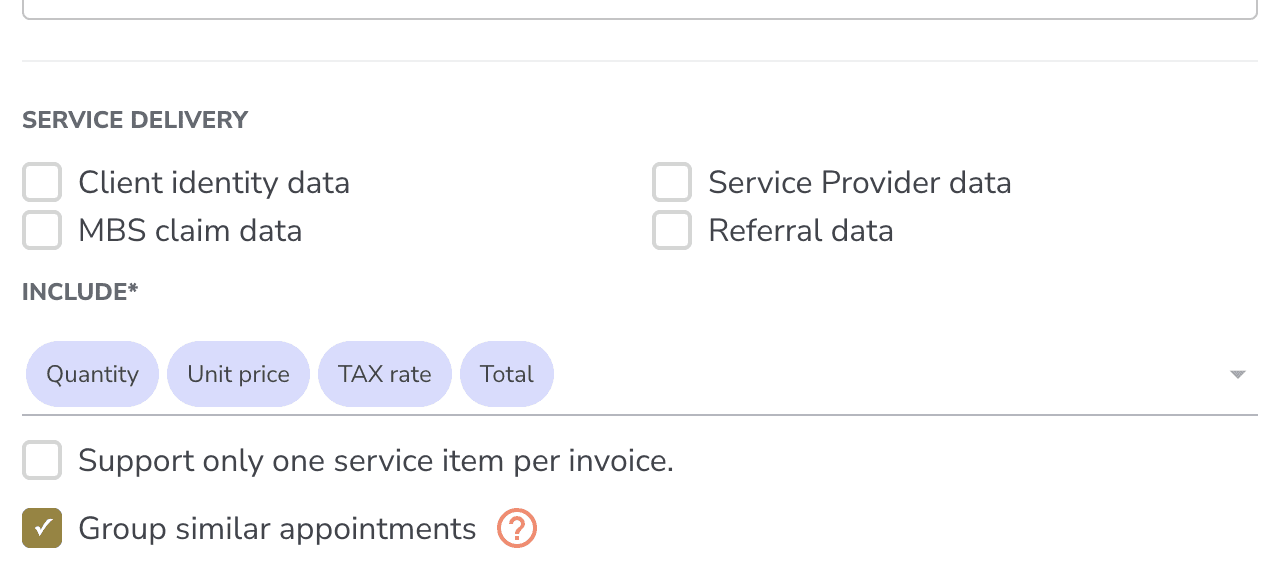
You can now collapse multiple appointments onto a single invoice line item with a quantity, instead of one line per appointment.
How It Works
Two appointments group into one line if they share both:
• the same appointment type (e.g. CBT, Counselling, EMDR), and
• the same rate.
Different rates or different types stay on their own lines, even if everything else is identical. The line description retains your template's existing detail per appointment, joined together, so the customer can still see the date, duration, and clinician for each session.
Where to Enable It
• Invoice template editor: new "Group similar appointments" checkbox. This sets the default for invoices generated from that template.
• Invoice generator: same checkbox, prefilled from the template. Toggle it on or off for the invoice you're working on.
Good to Know
• Automated monthly invoices honour the template setting. If grouping is on, the auto-generated invoice arrives pre-grouped.
• Manual edits to quantity or cost are kept until you add or remove an appointment. Any subsequent add or remove rebuilds the line from scratch.
• Single-item templates ("Support only one service item per invoice") still work alongside grouping. Multiple matching appointments collapse onto the one allowed line.
• Accounting sync (QuickBooks, Xero, Sage via Apideck) sends grouped lines with the correct quantity and total. Invoices reconcile cleanly on the accounting side.
Action Required
Medicare claims can only be filed against single-appointment invoices. Grouped invoices are explicitly disabled in the claim modal. You'll see "Grouped appointment invoices cannot be claimed." If you need to claim Medicare, leave grouping off for that invoice.