Release Note
Staff Onboarding Redesign
Release date:
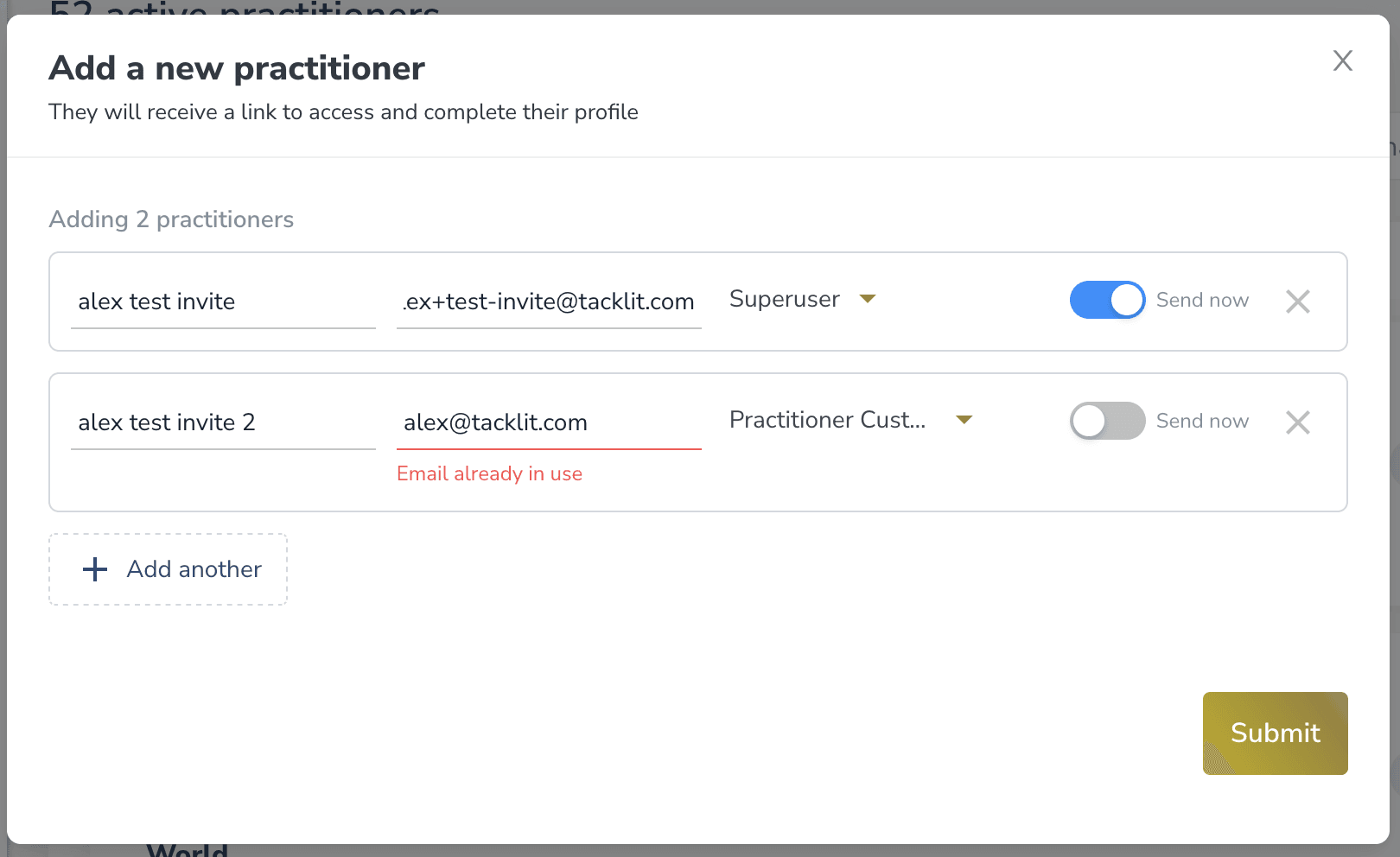
A redesigned flow for adding new clinicians and admin staff to your practice. Faster to set up, easier to manage, and clearer at every step.
Highlights
• Add multiple teammates in one go. The "Add New Teammate" flow now supports batch invites. Drop in a list of names, emails, and roles, and send everyone their welcome email at once. No more inviting staff one by one.
• A "Pending" tab on your team list. Anyone you've invited but who hasn't completed signup yet now appears under a dedicated Pending tab on the Practitioners page, with a count badge so you can see at a glance how many invites are still outstanding.
• Edit pending teammates before they sign up. Open a pending teammate's profile, update their details (name, role, contact info), and the changes will be waiting for them when they accept the invite. No need to wait for them to register first.
• Resend, cancel, or copy invite links anywhere. Whether you're on the Pending tab list or inside a pending teammate's profile, the same set of actions is one click away: copy invite link, resend, or cancel.
• Smarter email changes. If you change a pending teammate's email before they've signed up, the existing invite link stops working and you're prompted to send a fresh one. No broken links, no confusion.
Rollout
Behind a feature toggle so users will still see the old invite modal and can use that flow without change. Being turned on for the Together Mental Health account for testing first.