Release Note
AI Session Summary Revision
Release date:
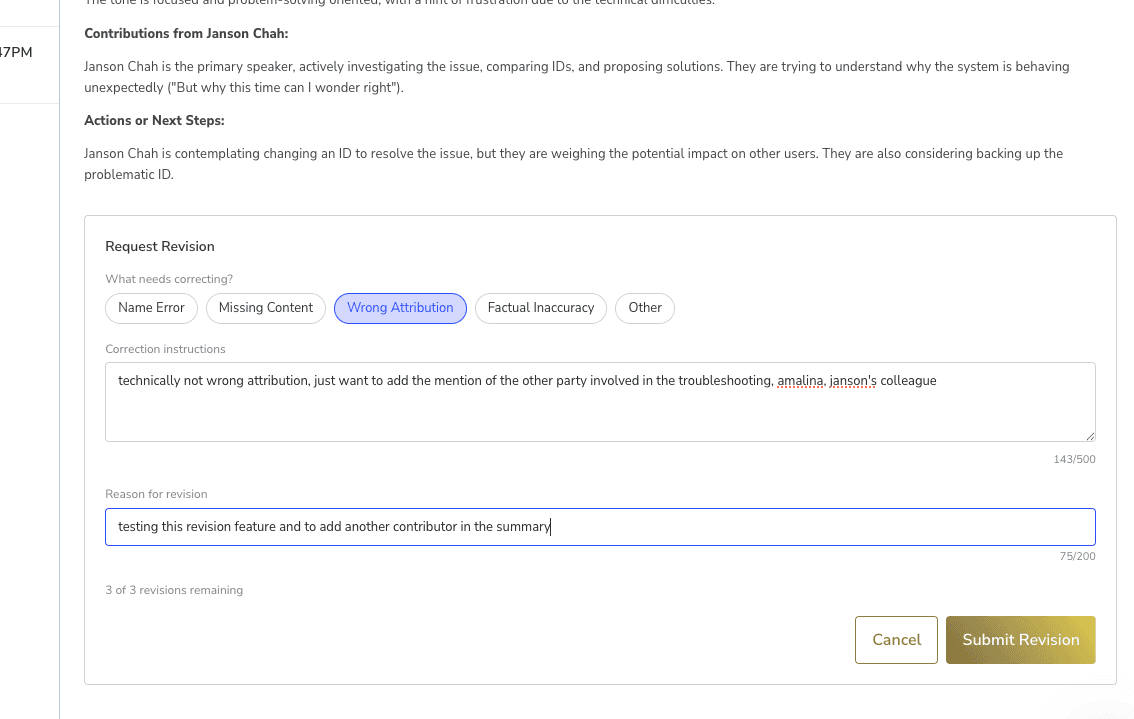
Superusers can now request revisions to AI-generated session summaries directly from the case note, ensuring clinical documentation is accurate and complete.
How It Works
• Open any AI transcription summary (case notes titled "AI Summary | ...")
• Click Request Revision and select the issue categories (Name Error, Missing Content, Wrong Attribution, Factual Inaccuracy, Other)
• Provide correction instructions and a reason for revision
• The summary is regenerated using the original transcript with your corrections applied — the clinician's input takes priority over what appears in the transcript
• The revised note updates in-place automatically — no page refresh needed
Revision History
• A banner shows when a note has been revised, including who requested it and when
• Expand the revision history to see all past revisions with their status, categories, and instructions
• PDF exports include a revision annotation with the latest revision details
Limits and Access
• Maximum 3 revisions per case note
• Only one revision can be in progress at a time
• Only Superusers (Admin) can request revisions
• Revisions are only available for notes that have an original transcript on file
Good to Know
Revision typically completes within approximately 2 minutes. If it takes longer, a manual refresh button appears. If a revision fails, an error alert is shown and the revision slot is returned so you can try again.