Release Note
Email Channel for Broadcast Messages
Release date:
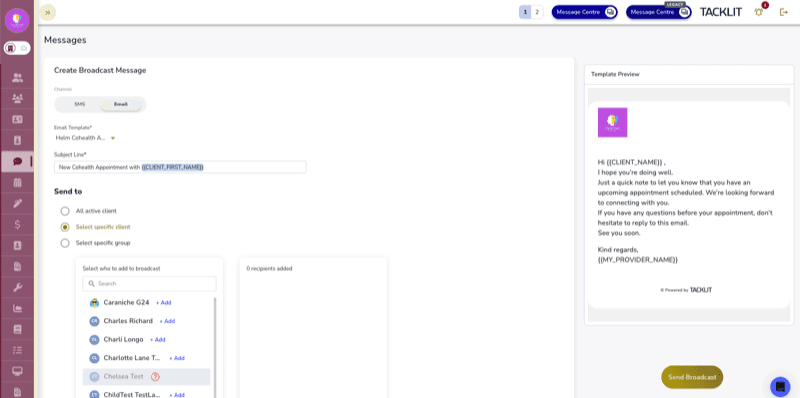
Email has been added as a new broadcast channel alongside SMS, allowing clinicians to send broadcast emails to clients using custom email templates with a live preview.
Channel Toggle
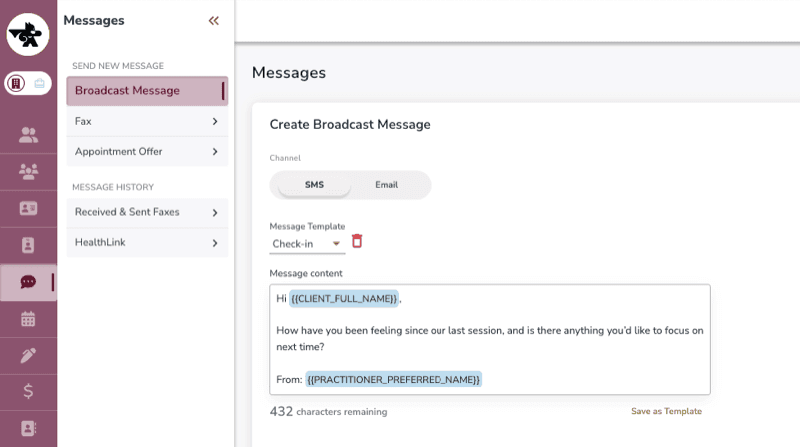
The Broadcast Message form now includes a channel toggle to switch between SMS and Email. If you switch channels after composing content, a confirmation prompt appears to avoid accidental loss of your draft.
Email Template Selector
When sending a broadcast email, select from your custom email templates. A live iframe preview shows the resolved template including your practice logo, so you can see exactly what clients will receive before sending.
Subject Line and Merge Fields
The subject line auto-fills from the selected template and supports merge fields for personalisation:
• Client Name
• Client First Name
• Practice Name
How It Works
• Open the Broadcast Message form and toggle to the Email channel
• Select a custom email template from the dropdown
• Preview the resolved template in the live preview panel
• Customise the subject line using merge fields if needed
• Select your recipients and send
Good to Know
Email templates are managed separately in your email template settings. The broadcast email feature uses your existing custom templates — no additional setup is required beyond having templates configured.