Release Note
Forms Templates Redesign
Release date:
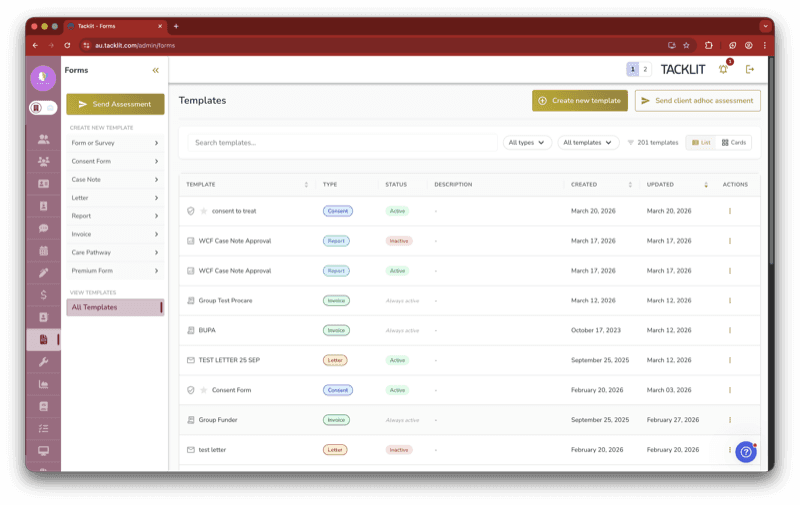
The forms page has been redesigned from a multi-column layout into a single unified list showing all templates together, making it faster to find and manage your form templates.
What’s Changed
Previously, forms were displayed in separate columns — one for surveys, one for consent forms, one for case notes, and so on. You had to scroll sideways through columns to find what you needed, with no way to search, filter, or sort.
New Capabilities
• Search by name or description
• Filter by template type or active/inactive status
• Sort by name, created date, or updated date
• Switch between a table view and a card view
• Paginate through templates (20 per page)
Smarter Action Menus
The three-dot action menu on each template now shows only actions that actually work for that type — no more clicking an action only to get a “not supported” message. Setting a template as default shows a spinning star and locks other templates from being set as default until the operation completes.
Good to Know
This is a visual and interaction redesign of the existing forms page. All your existing templates, settings, and configurations are preserved — nothing has changed behind the scenes.