Release Note
Parchment Admin User ID Setup
Release date:
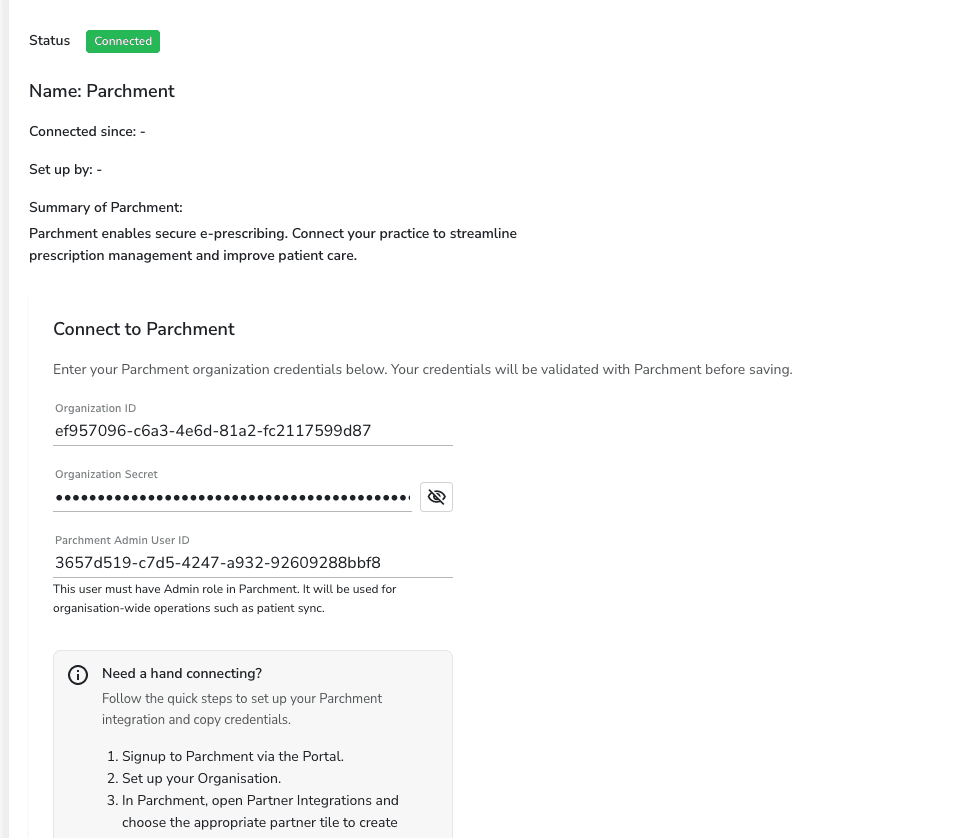
A new Parchment Admin User ID field has been added to the organisation’s Parchment integration setup. This account is used for organisation-wide operations like patient sync, separate from individual practitioner credentials.
How It Works
• Administrators can configure it in Control Panel > Integrations > Parchment alongside the existing Organisation ID and Secret
• After saving, they are prompted to set up their own personal User ID via their practitioner profile
• Practitioner User IDs are now managed exclusively by administrators through Team > Practitioner > Medicare/Prescribing
For Practitioners
• Practitioners who haven’t been set up will see a message to contact their admin, both on the integration page and in the header warning banner
• The Prescribe button is also disabled with a tooltip until their setup is complete