Release Note
SMS Location Instructions
Release date:
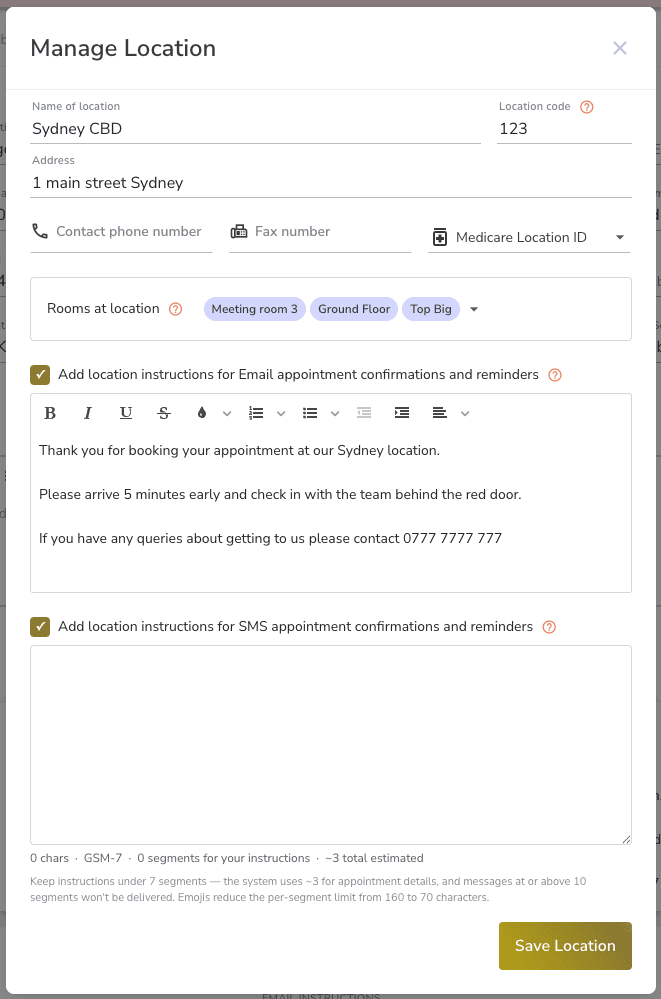
You can now add SMS-specific location instructions to each of your practice locations, separate from the email instructions you already write for appointment confirmations and reminders.
What’s New
When managing a practice location, there are now two independent instruction fields:
• Email instructions — Rich text, supports formatting. Included in appointment confirmation and reminder emails to clients.
• SMS instructions — Plain text, supports emojis. Included in appointment confirmation and reminder SMS messages to clients.
Each field is opt-in via a checkbox, so you can enable one, both, or neither depending on your needs.
Why Separate Fields?
Email and SMS are different formats. Formatting like headings, bullet points, and links don’t translate meaningfully into a plain SMS message. The new SMS instructions field lets you write concise, plain-language directions crafted specifically for SMS, including emojis.
SMS Segment Guidance
SMS messages are delivered in segments of up to 160 characters (or 70 if your message contains an emoji). As you write your SMS instructions, a live counter shows:
• Character count and encoding (standard or emoji)
• Segments used by your instructions alone
• Estimated total segments including the appointment details the system adds automatically
The system adds approximately 3 segments of appointment details (client name, date, time, delivery type) around your instructions. Messages that reach 10 segments or more will not be delivered, so keeping your instructions under 7 segments gives the best reliability.
Action Required
If you have email location instructions set on any of your practice locations, your clients will no longer receive those instructions via SMS. Previously, the system would convert your email location instructions into plain text and include them in SMS messages. This is no longer the case — the two fields are now fully independent.
What to do: Go to your practice location settings, enable the SMS instructions checkbox for each location, and write a plain-text version of your directions.
Existing locations without email instructions: No action is required. Appointment SMS messages will continue to send as before.